
E-Compete Steps and Flow Charts
Flow Charts
Read the steps below and view or print the flow chart of steps for your selected option:
 Show Evaluate-Compete Standard flow chart
 Hide
Hide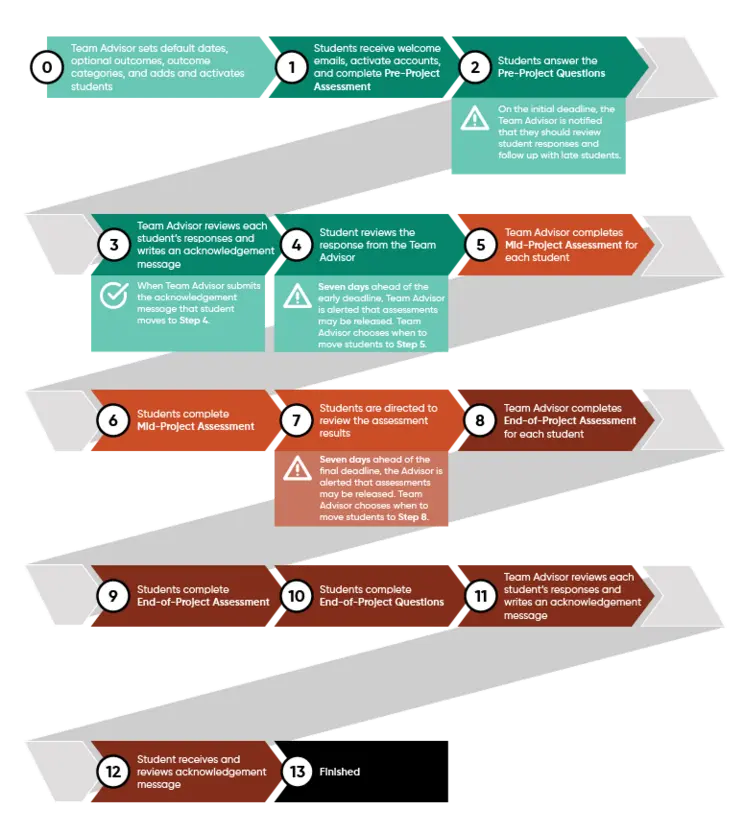
E-Compete Steps
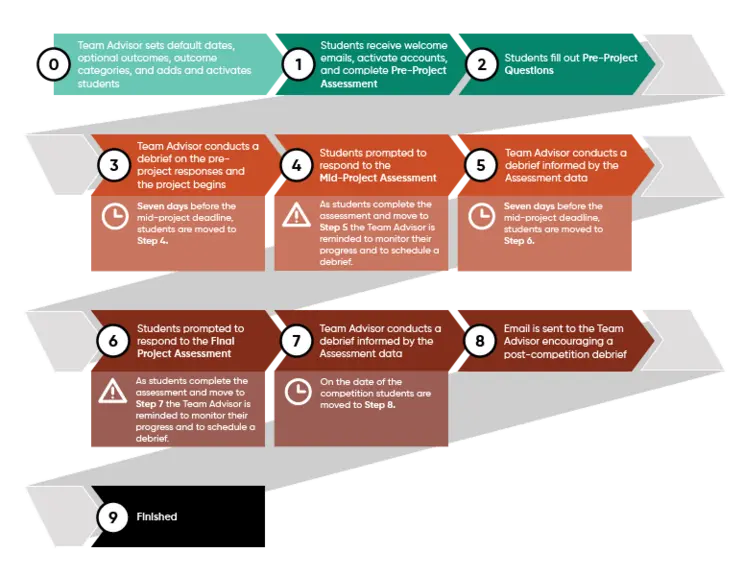
Note: The description below applies to the option of E-Compete where the assessments are only scored by the students. Differences between this option and the standard option will be noted. It is highly recommended that the Team Advisor download/print the flowchart for the E-Compete option being used. This is the most complete explanation of the steps and actions for the E-Compete option.
Getting Started
After team forms:
- Team Advisor completes onboarding steps to prepare for implementation, including setting default dates, optional outcomes, outcome categories, and adding students.
- Team Advisor introduces E-Compete to the team and explains what it is and how it works.
Implementing E-Compete
After students have been working 4-6 weeks:
- Team Advisor activates students.
- Students receive welcome emails, activate accounts, and complete Pre-Project Questions and Pre-Project Assessment (all general & competition-specific outcome categories).
- Team Advisor conducts a team conversation to go over outcomes.
Throughout the year (optional):
- Play the metacognitive card game.
2-3 months after the team has been working:
- Students receive an email with a link to access the Mid-Project Assessment seven days before the deadline.
- If using the E-Compete Standard version, this is sent once the Team Advisor completes student assessments.
- Team Advisor conducts a debrief informed by the Mid-Project Assessment data.
~1 month before competition:
- Students receive an email with a link to complete the Final Project Assessment.
- If using the E-Compete Standard version, this is sent once the Team Advisor completes student assessments.
- Team Advisor conducts a debrief informed by the Final Project Assessment data in advance of the competition.
After the competition:
- The Team Advisor is encouraged to conduct a post-competition debrief.