
Student Data
The information in this guide will help you to make the most of the data collected using EvaluateUR-CURE.
Jump down to: View Full Class Data | Explanation of Statistical Measures
Important
To ensure you are generating and using meaningful data, it is essential that all E-CURE steps be completed at the appropriate time during the research experience. Any significant time lag in completing E-CURE steps will compromise the findings.
Individual Student Score Reports
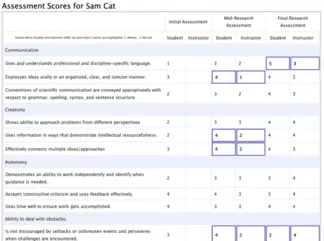 A screenshot of an individual student score report with highlighted outcome components. Click to enlarge the image.
View Full Class Data
The CURE instructor can view the data for all students in their CURE. These data can be accessed by clicking the 'View and Export Data' tab in the upper right-hand corner of the instructor dashboard.
A note on data storage
Because the SERC server will automatically delete all current academic year E-CURE data after one year, we recommend that you download all data that you might want to use either for reports or for additional analyses in the future. Keep in mind that if you decide to use your data to conduct your own research, you will need to go through your institutional review process.
Instructors are presented with three options for interacting with the student data:
- View Student Survey Summary - provides survey responses to open-ended questions for each student
- View Assessment Summary - a view of assessment summaries for all selected outcome components
- Download all data as a CSV - downloads a complete copy of the student and instructor data
Additional details on each option are provided below.
Student Survey Summary
Selecting View Student Survey Summary displays the student responses to the Pre-Research and Post-Research Open-Ended Survey Questions for each student. This is most useful for viewing all student survey responses together, question by question.
Assessment Summary
View Assessment Summary provides an in-browser view of assessment summaries for all outcome components you have selected for your CURE, by initial, early/mid, and final time periods. Note that the view will change if it is a two-semester CURE, and will display initial, early/mid, late, and final time periods. This display has four tabs at the top. Select the option you are interested in by clicking on the tab.
- Only class averages - overall class average (both student and instructor) for each of the outcome categories.
- Individual student averages – by individual student average (names visible) and CURE instructor score by component.
- Individual student averages (names omitted) - by individual student average (names omitted) and instructor score by component. This is useful in case the CURE instructor wants to share the data with the class anonymously or with colleagues.
- Class averages graph - provides a graphical view of student and instructor assessment averages for each outcome category.
Averages are calculated for the mean score for the responses: 5=always, 4=usually, 3=often, 2=seldom, 1=not yet, 0=not yet observed. Responses with a 0 value are not included when calculating the means (because they really reflect a type of 'no response' rather than having actual numeric meaning). The maximum average value is 5.0 and the minimum is 1.0.
Download all data
The Download all data as a CSV link exports all data to a .CSV file which can be opened by most spreadsheet software (e.g., MS Excel, Google Sheets). This is useful if you want to archive the data or explore it in other ways. The columns will represent the variables and the rows will represent the student and instructor cases. The file includes student and instructor responses to the:
- All assessments
- Initial Student Survey responses
- Final Student Survey responses
- Any optional questions
Explanation of Statistical Measures
Sample Size
The number of respondents (n=) is provided. It is useful to compare this value to the total number of students in your class Any difference – that is, when 'n' is less than the number of students that you registered and activated – is due to one or more of the students not completing all the EvaluateUR steps.
Means
The statistical mean refers to the average for the data and is determined by adding all the assessment score points assigned to a given population of students and then dividing that total by the total number of students. It is not unusual for students to tend to score themselves higher at the initial assessment and then to adjust (decrease) their score on many of the items at the early/mid research assessment when they know more about the research and what they are capable of, and then score themselves higher at the final assessment because they have gained appreciable skills. This is common in student pre-mid-post self-assessments. The Dunning-Kruger effect is a psychology term to describe the cognitive bias in which people incorrectly overestimate their knowledge or ability in a specific area. This tends to occur because a lack of self-awareness prevents them from accurately assessing their own skills. This effect and resulting score pattern is a hallmark of metacognitive growth and is demonstrated with a curvilinear (U-shaped) growth line. As the student becomes more self-aware they adjust their scores downward because they recognize their lack of knowledge / experience and then proceed to resolve the deficit as shown in the final score.
Standard Deviation
The standard deviation (SD) is a measure of the spread of the data around the mean. By definition: 68.3% of data are within one standard deviation of the mean; 95.5% of data are within two standard deviations of the mean; and 99.7% of data values are within three standard deviations of the mean. Basically, the larger the SD, the more scatter you have around the mean (average value). This would suggest that there is a greater range in the responses reported by you and/or the students in the CURE. There is no clear definition for what constitutes a low or high standard deviation as it depends on the sample and the tolerance for variability. For example, you might see a high variation if some of your students are completing their first undergraduate research experience while others are on their second.