
Initial Publication Date: January 17, 2023
EvaluateUR Steps and Flow Charts
Read the steps below and view or print the flow chart of steps for your selected option:
 Show EvaluateUR Standard (student-mentor scored) flow chart
 Hide
Hide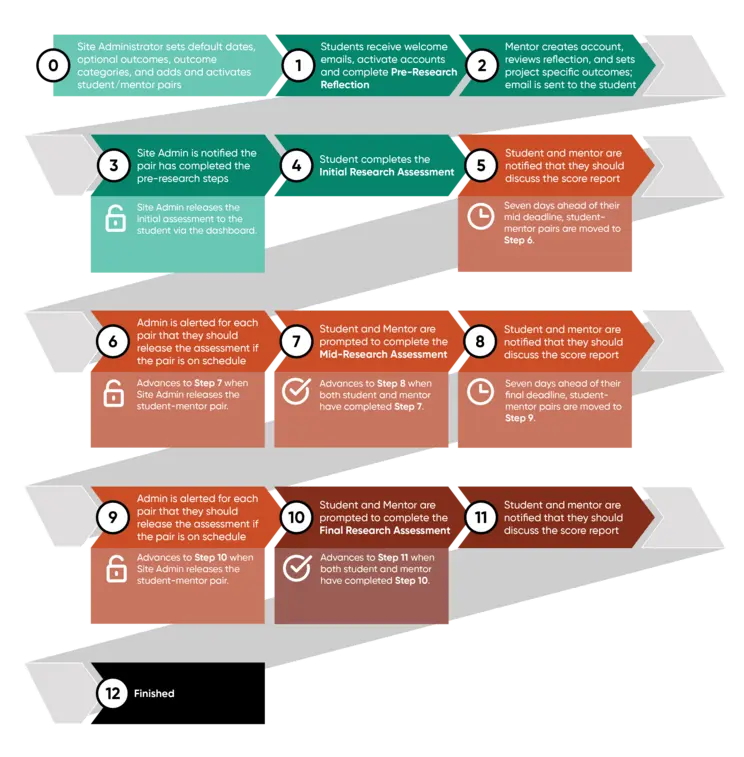


Note: The steps outlined below apply to the EvaluateUR Standard (student-mentor scored) option. Differences for the other versions will be identified. It is highly recommended that you print out a flow chart for the option you are using for more complete information, including when moving from one step to the next requires an 'action'.
Getting Started
Note: For research programs with 3 or fewer students, the research mentor serves as the site administrator.
- Students are accepted into the research program.
- Site Administrator completes Onboarding steps (includes setting up the program dashboard and becoming familiar with the dashboard features and automatically generated data).
- Students and mentors attend an Orientation Session run by the site administrator.
Pre-Research
- Students receive automated email instructing them to set up an account and complete the Pre-Research Reflection.
- Mentors review students' reflections and complete built-in feedback forms that are automatically sent to the students.
- Students and mentors meet to discuss outcome categories and components and together each student-mentor pair complete the Pre-Research Assessment. Alternatively, students complete the initial assessment on their own and meet afterwards with their mentor to discuss how the outcomes relate to the student's research program. Site administrators have flexibility in how they prefer to have the initial assessment completed.
- A Score Report is available to each research pair recording the ratings submitted for each outcome component.
Mid-Research
- Site administrator receives automated reminder about upcoming deadline for completing Mid-Research Assessments.
- It is recommended that site administrator checks in with mentors to determine that no delays in research have been encountered. If a particular pair needs extra time to reach the mid-point, the Site Administrator can adjust the 'deadline dates'. Once the research program has started, this change needs to made for a specific student-mentor pair (or student if using the student-only option). You cannot change the deadline date(s) for all using the 'date box' completed during dashboard setup.
- Students and mentors receive automated messages with instructions and link to complete the Mid-Research Assessment (only students receive this message for the student-only version).
- Students and mentors each receive and review Score Report (only students have access to the score report and should be encouraged to download their score report to share it with their mentor).
- Students and mentors meet to discuss how the research is going, taking advantage of the Score Report. It is recommended that students and mentors talk about their reasons for assigning particular ratings.
End of Research
- Site administrator receives an automated reminder about an upcoming deadline for completing the End-of-Research Assessment.
- Site administrator checks with mentors to determine if delays in research were encountered, requiring them to adjust one or more 'student-mentor deadline dates'. See "Mid-Research" note above relating to adjusting deadline dates for a student or pair.
- Students and Mentors receive automated messages with instructions and link to complete the End-of-Research Assessment (only students will receive this message if using the student-only scored option).
- Students and mentors receive and review Score Report (see "Mid-Research" note above).
- Students and mentors meet to discuss the Score Report (see "Mid-Research" note above).