Unknown #9
Download and view the crystal structure data
- Right click on Unknown_9.amc ( 189bytes Dec30 04) to download the crystal structure to your computer. (This file was modified from an AMC file in the American Mineralogist Crystal Structure Database).
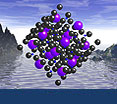
- Once the file has downloaded to your computer, click on it to automatically start XtalDraw and open the file for viewing. You should see something like this...

- Try to resist looking at the mineral chemical formula (Edit > Chemical Formula) as this will probably be too big of a hint right off the bat.
Determine the identity of the unknown
Using your knowledge of crystallography and systematic mineralogy, and manipulating the downloaded structure in XtalDraw, answer the following questions to deduce the identity of the unknown. Check your answers by clicking on the "show answer" tabs which appear with each question.
-
Is this mineral a silicate or non-silicate? If non-silicate, what class of minerals does it belong to?
-
-
If this mineral were a phyllosilicate (it isn't), and if the "Fe layer" was the octahedral layer, what type of phyllosilicate would this mineral be?--trioctahedral (like biotite) or dioctahedral (like muscovite)?
-
Dioctahedral. Notice the "holes" in the dioctahedral layer. The holes are there to preserve charge balance.
-
What are the two cations in this mineral?
-
...so what mineral is this?
-
Ilmenite - FeTiO
3 Ilmenite
Image courtesy of Amethyst Galleries.
The structure is from Wechsler & Prewitt (1984) American Mineralogist 69:754-770
 Show question #1
 Hide
Hide