Unknown #6
Download and view the crystal structure data
- Right click on Unknown_6.cmdf ( 2kB Dec16 09) to download the crystal structure to your computer. (This file was modified from a CIF file in the Crystal Structure Library provided in CrystalMaker).
- Start the CrystalMaker program.
- Choose the File > Open command, and select the file you just downloaded to view in CrystalMaker.
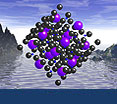
- Click on OK to generate the crystal structure for viewing. This structure is given to you with some of the bonds drawn depicted in the structure. You should see something like this...

Determine the identity of the unknown
Using your knowledge of crystallography and systematic mineralogy, and manipulating the downloaded structure in CrystalMaker, answer the following questions to deduce the identity of the unknown. Check your answers by clicking on the "show answer" tabs which appear with each question.
-
Is this mineral a silicate or non-silicate? Can you narrow it down to a more specific group based on the composition?
-
-
What crystal system does this mineral belong to?
-
...so what mineral is this?
-
Marcasite - FeS
2
 Marcasite
Image courtesy of Amethyst Galleries.
The structure is from Buerger M J (1937) American Mineralogist 16:361; Zeitschrift fuer Kristallographie, Kristallgeometrie, Kristallphysik, Kristallchemie 97:504
You should have realized from the composition that the mineral was a Fe-sulfide. Pyrite is ruled out because of its isometric (cubic) crystal system. That leaves the other polymorph of FeS
2, Marcasite, which is orthorhomic.
 Show question #1
 Hide
Hide