Unknown #10
Download and view the crystal structure data
- Right click on Unknown_10.cmdf ( 2kB Dec16 09) to download the crystal structure to your computer. (This file was modified from a CIF file in the Crystal Structure Library provided in CrystalMaker).
- Start the CrystalMaker program.
- Choose the File > Open command, and select the file you just downloaded to view in CrystalMaker.
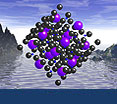
- Click on OK to generate the crystal structure for viewing. You should see something like this...

Determine the identity of the unknown
Using your knowledge of crystallography and systematic mineralogy, and manipulating the downloaded structure in CrystalMaker, answer the following questions to deduce the identity of the unknown. Check your answers by clicking on the "show answer" tabs which appear with each question.
What crystal system does this mineral belong to?
Is this mineral a silicate or non-silicate?
Click on
Edit > Bonding to draw the C-O bonds. Click on
Add and choose "C" under
From and "O" under
To. Clicking on the box under
Info will give you information about coordination. Finally, click on
OK to draw the bonds. The window should look like this...
What element is C bonded to in this mineral, and what is the coordination of C? (hint: use the
Model > Polyhedral command to plot the structure as a polyhedral model).
Each carbon is bonded to three oxygens, forming triangular CO3 groups.
What class of non-silicate minerals does this belong to?
Go back to
Edit > Bonding and add the Ca-O bonds to the structure. What is the coordination of Ca in this mineral?
...so what mineral is this?
Calcite - CaCO
3
 Calcite
Image from the New York State Academy of Mineralogy
The structure is from Graf, DL (1961) Crystallographic tables for the rhombohedral carbonates. American Mineralogist 46:1283-1316
The only other polymorph of CaCO
3 is aragonite, but it is orthorhombic.
 Show question #1
 Hide
Hide